
When you connect AI to your business systems through PopdockAI’s Model Context Protocol (MCP), you get three key capabilities: Resources (data access), Tools (actions and operations), and Prompts (reusable text templates).
Prompts are the simplest of the three architecturally, but don't mistake technical simplicity for lack of importance. In practice, prompts solve one of the most difficult problems in enterprise AI: making your AI understand your business. Prompts are where you encode the judgment calls, tribal knowledge, and business context that make your operations unique.
The Problem: AI Doesn't Know Your Business
Here's the challenge every business faces when integrating AI: Claude, ChatGPT, and other AI models know everything about "how to create a sales opportunity” in general or "how support tickets work” in theory. What they don't know is anything specific about your business.
They don't know:
- Your qualification criteria and what actually makes a good lead for you
- How your team decides whether something is urgent
- Your communication style and brand voice
- When to escalate and to whom
- Which customers get special treatment and why
This gap between generic AI intelligence and organizational intelligence is where most AI integrations fail. You end up with a powerful tool that doesn't understand how your business actually works.
What MCP Prompts Actually Do
MCP prompts are how you bridge the AI context gap. When a user invokes a prompt in PopdockAI, it injects your pre-written instructions directly into the conversation as if they had typed that detailed context themselves, but without requiring them to remember or compose it. These prompts are reusable templates that encode your business context, judgment criteria, and institutional knowledge into instructions that AI can follow consistently.
The quality of AI output depends entirely on the quality of input. Vague questions get inconsistent results, and detailed context gets reliable outcomes. Without prompts, every user has to figure out the right way to ask AI to do something.
With prompts, you've already written the detailed instructions; users simply have to select the right prompt for their situation. The quality of AI responses becomes consistent because everyone uses tested, refined instructions.
By using these pre-defined prompts, you're showing AI "here's how WE handle these situations." Once captured in a prompt, that knowledge becomes:
- Reusable: Available to everyone on your team
- Testable: You can verify it works correctly
- Improvable: Refine it based on real-world results
- Scalable: New hires benefit from day one
Why Prompts Matter
Capturing Expertise That Scales
Every business has experts whose judgment is invaluable. One employee may know which customer signals indicate churn risk, while another can read between the lines of a support ticket to spot expansion opportunities. That knowledge usually lives in their heads, but prompt templates allow you to capture that expertise and make it available to everyone:
- Document how to properly evaluate customer health
- Structure pattern recognition for new opportunities
- Make professional judgment criteria available to the whole team
- Preserve institutional knowledge even when people leave
With MCP prompts, you're not just scaling operations; you're scaling expertise itself.
Your MCP server's tools handle structured operations like reading CRM data, creating tickets, and updating records. That's essential infrastructure, but business runs on judgment calls, like "Should this go to sales or support," "How urgent is this really," "Is this customer at risk," and "What would our expert do here?"
Tools handle the "what" and "how" of system operations, while prompts handle the "when" and "why" of business decisions. Together, they make AI that understands both your systems and your strategy.
Ensuring Consistency Without Training Overhead
How do you ensure ten support agents handle situations the same way? Traditionally, you provide training and documentation, hoping they remember.
With prompts, they all use the same template. The result:
- Junior agent + good prompt = senior-level decisions
- Everyone applies your business logic consistently
- New hires get access to legacy expertise on day one
Some business processes require multiple steps, context from several systems, and judgment at each stage. Doing them correctly takes expertise and time. Prompts package entire workflows into single, guided actions:
- "Handle VIP Customer Escalation" instead of remembering ten manual steps
- "Generate Customer Context Brief" instead of clicking through five systems
- "Assess Renewal Risk" instead of manually reviewing metrics and communications
This process makes it easy to do the job correctly.
Continuous Improvement of Business Logic
Here's where prompts get really powerful: You can treat your business judgment as code.
Traditionally, you train people on how to handle things correctly and hope they remember, leading to inconsistencies. With prompts, you document your judgment criteria, test against real examples, find edge cases, refine the prompt, and everyone benefits immediately.
Example evolution:
- v1: "Route support tickets: technical → tech team, sales questions → sales"
- v2: "If account has active opportunity >$25K, CC sales on technical tickets."
- v3: "Trial accounts get tech support only unless they mention budget/timeline signals."
- v4: Add handling for VIP customers, urgent timeframes, and repeat issues
Each version captures learning from real situations, showing a continuous improvement of your decision-making logic.
The Bottom Line
Prompts are essential because they solve the adoption problem that kills most enterprise AI projects. Because prompts are easy to create, test, and refine, you can iterate quickly on your business logic. They're just text, so your subject matter experts can review and improve them without technical bottlenecks. You’ll also see value immediately with reduced training time, fewer errors, consistent quality, and faster onboarding.
When you build your own MCP server, you might focus first on connecting to your CRM, ERP, and helpdesk systems. While that's important infrastructure, prompts are where you embed your business judgment criteria, tribal knowledge, and your way of doing things. They're what transforms "AI connected to our systems" into "AI that thinks like our business."
In a world where everyone has access to powerful AI models and can integrate them with business systems, the differentiator isn't the technology; it's how well you've taught that technology to understand your specific business context.
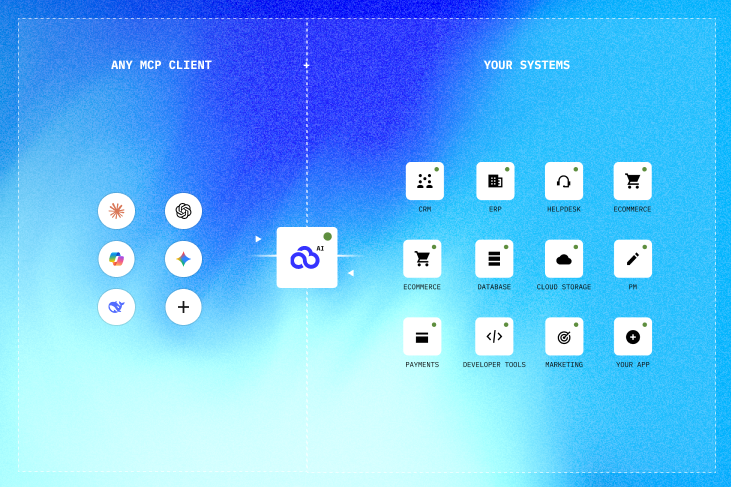
PopdockAI, which had been available for limited release since October 2025 for customers and partners with special use cases, is now rolling out to the general public.

popdock gets your data out. popdock-manage builds the setup that makes that data reachable. Here's why they're separate tools, and when to reach for each.
Web UI vs. CLI. To an AI agent, this is the difference between a task that costs a few thousand tokens and one that costs a few hundred thousand.
From AI Potential to AI Performance in Minutes
One layer.
All your apps.
Any AI tool.
Join forward-thinking companies that are transforming their operations with intelligent, secure AI automation.