Get Files
Every business runs on documentation. Make your document storage conversational, letting your AI assistant retrieve exactly the files you need from any connected storage system.
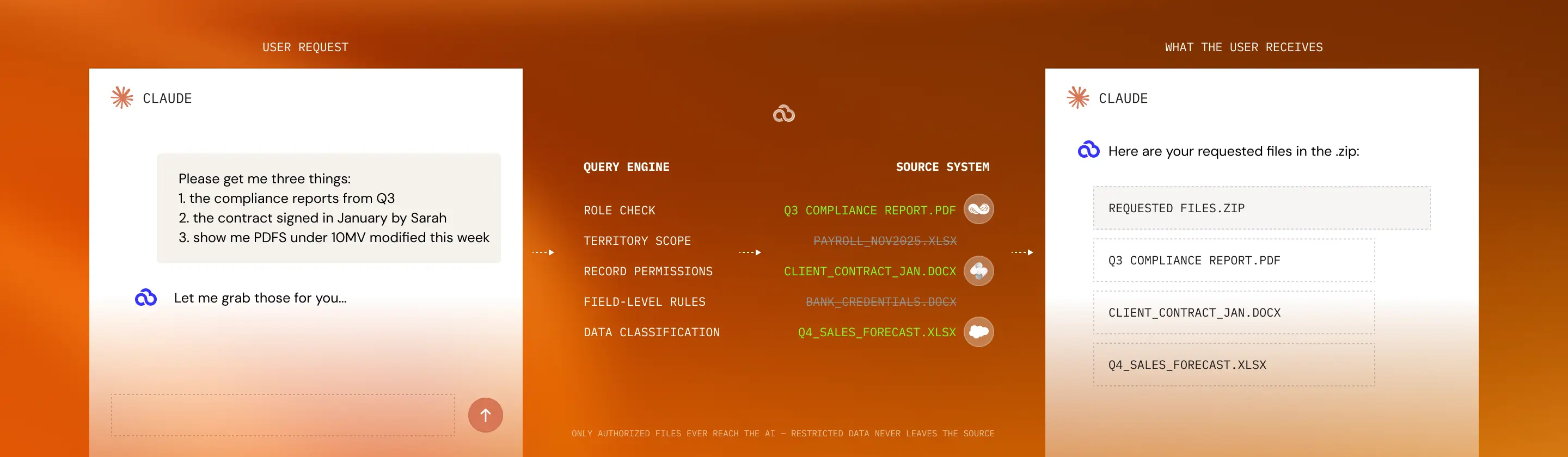
Give Users Full Control Over
Returned Files
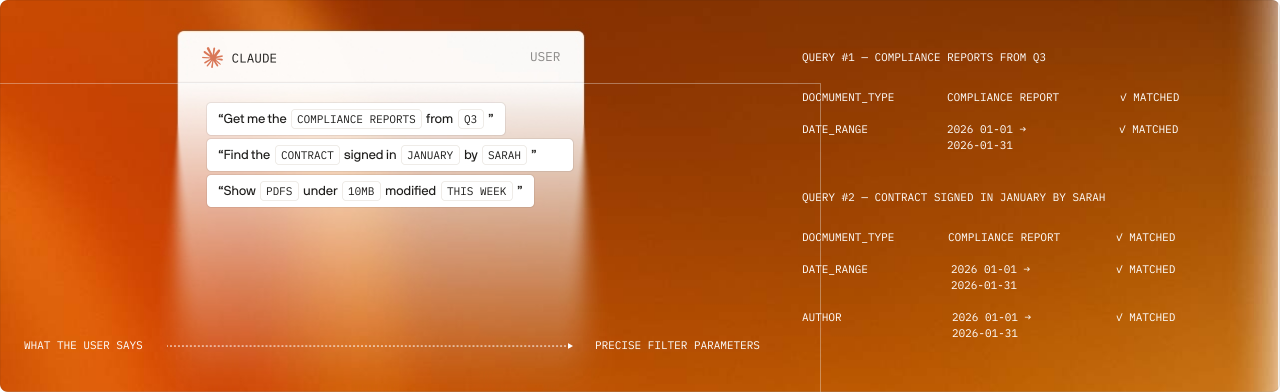
Smart filtering
Smart Filtering for Precise Document Retrieval
Finding the right document shouldn't mean scrolling through endless folders or remembering complex file naming conventions. PopdockAI's parameter-based filtering lets you define exactly how users can narrow down their file requests.
Filter by What Matters
Build scripts that clean customer data, validate order entries, and enforce data quality standards before information enters your business systems.
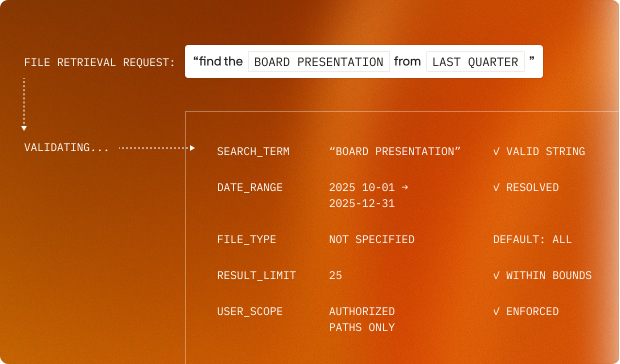
Parameter validation
Bulletproof Parameter Validation
File retrieval needs the same precise authorization as data queries. Every parameter is validated before searching to ensure requests are well-formed and will return meaningful results.
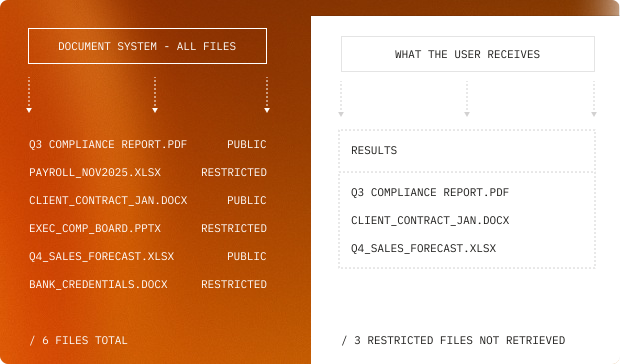
Fixed security restrictions
Security Through Fixed Restrictions
Document access control is critical. PopdockAI's fixed restrictions ensure users only retrieve files they're authorized to access, with security enforced at the tool definition level.
Leverage Easy File Management and Specialized Instructions
Automatic Zip File Creation
When file requests return multiple documents, individual downloads become overly complicated. PopdockAI automatically packages results into organized zip files when retrieval exceeds practical thresholds.
Smart packaging
Users get everything they need in one convenient package, whether it's three files or three hundred
Automatic zip creation when file counts exceed configured limits
Descriptive zip file names (Customer_ABC_Invoices_Q3_2024.zip)
Compression for faster transfers and storage efficiency
Single download for dozens or hundreds of files
Maximum File Limits for Performance
Protect your systems and improve user experience with configurable file count limits. Set intelligent defaults that balance comprehensiveness with practical usability.
Flexible result control
Your file systems stay responsive, and users get manageable result sets, even when querying massive document libraries.
User-defined limits for targeted requests ("show me the 5 most recent...")
Default maximums that prevent overwhelming responses
Warning thresholds when results exceed practical review (100+ files triggers zip packaging)
Automatically pare down results with clear feedback ("showing first 50 of 247 matches")
Intelligent Sorting Options
Documents are only useful when organized logically. Give your AI assistant control over how results are arranged with both fixed and dynamic sorting capabilities.
Fixed sorting for consistency
Define default sort orders that ensure files always appear in the most logical sense.
Newest first for reports
Alphabetically for reference documents
By size for archives
MCP Client-Specific Instructions
Different MCP clients handle files differently. Popdock's client-based instructions optimize file delivery based on which MCP client is making the request.
Tailored file handling
The same tool adapts its delivery method to match each client's strengths—maximizing usability across every platform.
Download links vs. embedded content based on client capabilities
Inline text extraction for clients that can display document contents
Optimized packaging (single files vs. zips) based on client file-handling preferences
Parameter-based sorting for flexibility
Let users specify how they want results organized on the fly. Structured sorting parameters put the most relevant documents front and center.
By date: Filter newest to oldest, or oldest to newest to organize your records.
By name: Filter alphabetically from A-Z or Z-A to easily find the record you need.
By size: Filter largest to smallest, or smallest to largest to narrow your search.
By custom metadata: Customize your search by sorting by priority, status, project phase, or other custom fields.
Execution Transparency
Every file retrieval is logged with full query parameters, result counts, user context, and delivery method. Track what documents are being accessed, by whom, and how often. PopdockAI includes complete audit trails for compliance, security review, and usage optimization.
Real-World Applications
Legal Teams
This is filtered by client name and date range, sorted by signature date, returned as an organized zip file with folder structure by quarter.
Finance Departments
The user receives a list that is date-filtered, sorted by submission date, in individual PDFs for easy review, and restricted to the user's department.
Project Management
This is filtered by project metadata and file type, sorted by modification date, top 10 most recent, and secured to project team members only.
Compliance Officers
This is date-ranged, type-filtered (PDFs only), sorted alphabetically, packaged in a zip file named Q2_2024_Audit_Documents.zip for archival.
Sales Operations
This is customer-filtered with user-based restrictions, sorted by opportunity value, limited to active deals, delivered as individual files for immediate use.
Built for Document-Heavy Operations
Deploy file tools once and use them across your entire document ecosystem. As your folder structures evolve, update tools centrally without disrupting user workflows. As your team grows, add new restrictions and filters without starting from scratch.
Ready to unlock your data?
Start building tools that turn your business systems into AI superpowers
Join forward-thinking companies that are transforming their operations with intelligent, secure AI automation.