File Resources
Stop pasting documents into chat windows. Point a resource at a file in any connected system and your AI assistant reads the current version, every time, without a copy ever leaving your control.
Publish Once, Read Everywhere
Browse to the File, Not to an API
Finding the document should not require a developer.
Pick a path, not a payload
Choose a connector, browse the folder structure the way you would in a file explorer, and select the file. PopdockAI handles the retrieval, the encoding, and the content type so the client receives something it can actually read.
>
Browse live folder structures from your connected systems
>
Select a single file by path, no scripting required
>
Text and binary documents both supported
>
Content types are detected and passed through to the client
Always the Current Version
A document pasted into a conversation is out of date the moment someone edits it.
One file, one truth
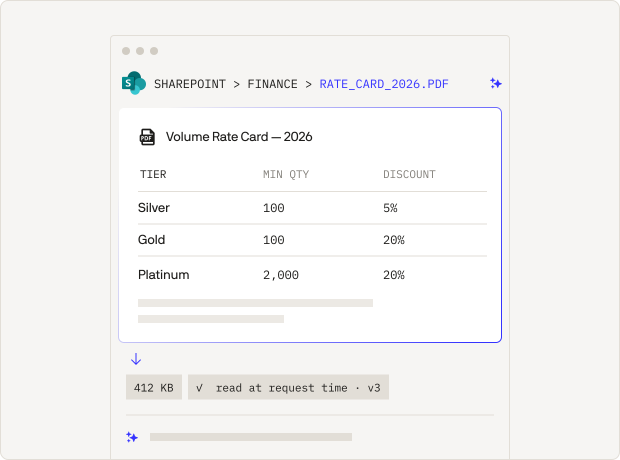
File resources read from the source at request time. When finance revises the rate card, every conversation that references it sees the revision immediately, with nothing to re-upload and nothing to re-share.
>
Reads happen at request time, not at publish time
>
Edits at the source are picked up automatically
>
No duplicate copies to keep in sync
>
No stale attachments living in chat histories
Reference Material,
Not Retrieval Plumbing
Your AI client already knows how to work with resources.
Native to the protocol
Files are published as standard MCP resources, so any compliant client can list them and read them. Users attach the document they need, or the client pulls it in on its own, with no custom integration on either side.
>
Discoverable through standard resource listing
>
Readable by any MCP-compliant client
>
Descriptions you write guide AI to the right document
>
Works alongside the tools on the same server
Ensure Security and Adaptability
in Any Environment
[01]
Access You Grant Deliberately
Publishing a document should never mean publishing it to everyone.
Governance at the resource
Access is granted per resource, by user, or by team. A contract published for the legal team is not readable by sales, and an MCP client can be restricted to only the files it should ever see.
>
User-level and team-level access rules
>
Per-client restrictions on which resources are reachable
>
Connector credentials stay in PopdockAI, never in the client
>
Inactive resources disappear from client listings immediately
[02]
Versions Without Surprises
Reference material changes, and changes need a safety net.
Draft, publish, roll back
Point a resource at a new path or rewrite its description as a draft, publish when you are ready, and roll back if the change causes trouble. Clients only ever read the published version.
>
Draft changes without affecting live conversations
>
Version notes recording what changed and why
>
One-click publish and one-click rollback
>
Full version history retained
[03]
A Read History You Can Audit
Documents are often the most sensitive thing on the server.
Every read recorded
Each request is logged with the user, the client, and the timestamp, so you can answer who read which document and when without reconstructing it from support tickets.
>
Per-resource read history
>
Client and user captured on every read
>
Timestamps for compliance reporting
>
Errors recorded alongside successful reads
Real-World Applications
Sales Teams

The published rate card is read straight from the document library, so quotes reflect the pricing finance approved this morning, not last quarter.
Finance Departments

The signed contract is read in place. Nothing is copied into the conversation, and the read is recorded against the user who asked.
Support Operations

The current procedure document is published once. When the on-call policy changes, every agent’s assistant reflects it without a single re-share.
Operations and Inventory

The specification PDF is published to the engineering team only, readable by their assistant and no one else’s.
Built for Scale,
Designed for Simplicity
Publish the documents your business runs on once and let every team read them through the assistant they already use. As your document libraries move and reorganize, update the resource centrally without touching a single client configuration. As your team grows, extend access by team instead of by person. Your reference material becomes as available as asking a question, as governed as your most sensitive folder, and as current as the file itself.