Resources
Tools tell AI what it can do. Resources tell AI what it needs to know. Publish files, saved list views, and your own business vocabulary as reference material any AI client can read, instantly, accurately, and securely.
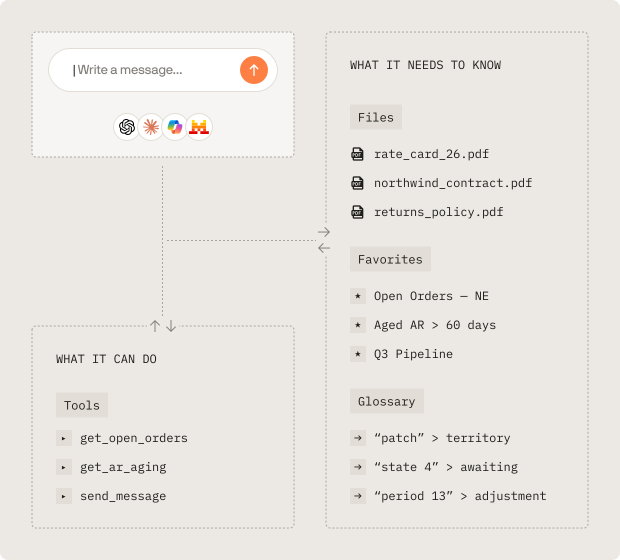
Three Resource Types for Every Kind of Context
Files
Publish a document straight from your business systems as reference material.
Point a resource at any file your connectors can reach and AI reads it in place. No downloading, no re-uploading, no copies going stale in a chat history.
What you can publish:
>
Policy and procedure documents
>
Price lists and rate cards
>
Contracts and statements of work
>
Specifications, templates, and reference PDFs
Favorites
Turn a saved list view into a reference AI can read.
Your team already built the views that matter. A favorite carries its own filters, sorting, and columns, so publishing one as a resource gives AI a curated answer instead of an open-ended query.
What you can publish:
>
Open orders for a single region
>
Aged receivables past 60 days
>
Active price agreements
>
This quarter's pipeline, exactly as your team defines it
Glossary
Teach AI how your business actually talks.
Every company has terms that mean nothing to a general-purpose model. A glossary resource is a set of terms and definitions you control, and each term can point AI at the tool that answers questions about it.
What you can publish:
>
Internal acronyms and system nicknames
>
Status codes and their real meaning
>
Fiscal calendar and period definitions
>
Region, division, and territory boundaries
Tools Act.
Resources Inform.
An MCP server without resources is a set of buttons with no manual. Tools run queries and execute processes. Resources supply the reference material that makes those tools land on the right answer the first time.
Resources live on the same MCP server as your tools and prompts, so a client that can reach one can reach all three.
Fewer wrong turns
When AI already knows what "backorder hold" means in your business, it stops guessing which tool to call.
Fewer round trips
Reference material AI can read directly means fewer clarifying questions and fewer discarded results.
One source of truth
Update the document, the favorite, or the definition once and every conversation across every client picks up the change.
Built for Real-World Governance
Delivery You Control
Decide how each glossary resource reaches your clients. Always on for context every conversation needs, on demand when AI should reach for it only when relevant, or off while you are still drafting.
Versions and Rollback
Every resource carries a version history. Draft a change, publish it when it is ready, and roll back the moment it is not. Your live conversations only ever see the version you published.
Security at the Resource Level
Grant access by user or by team, resource by resource. A published file is only visible to the people you named, and MCP clients can be restricted to the resources they are allowed to read.
Complete Read History
Every resource read is recorded: which resource, which client, which user, and when. Reference material gets the same audit trail as the tools that act on your data.
Ready to unlock your data?
Start building tools that turn your business systems into AI superpowers
Join forward-thinking companies that are transforming their operations with intelligent, secure AI automation.