Code mode
Built for the workflows a single tool call can't handle.
Code mode gives your AI assistant one programmatic tool that composes many operations together, so complex, multi-step workflows run in a single call. It works right alongside your individual tools — simple requests stay fast and direct while the hard ones get orchestrated.
What is code mode?
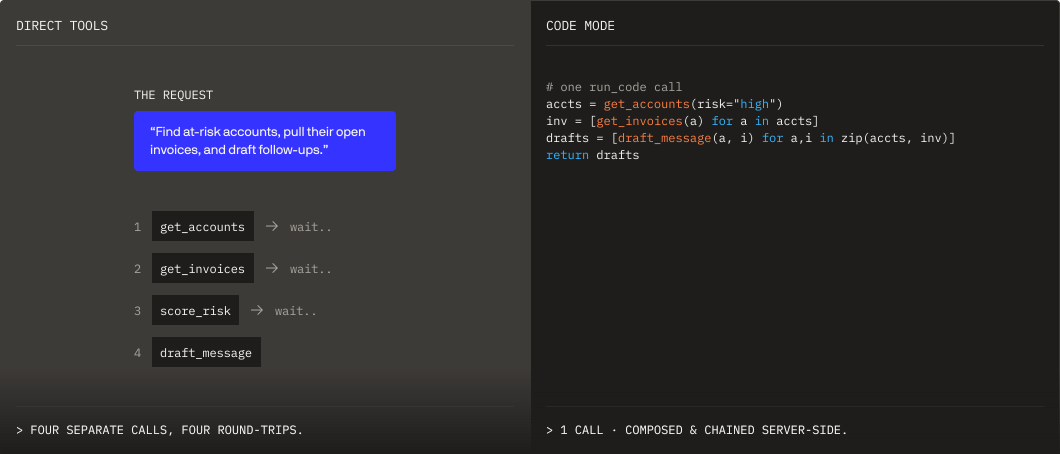
PopdockAI exposes your data through MCP tools your AI assistant can call directly. For most requests, that direct path is exactly right: one tool, one answer, fast. It's the foundation of everything PopdockAI does, and code mode is built to sit on top of it, not replace it.
Some requests are bigger. They span several tools, depend on each other's results, or need to be composed into a single sequence. Code mode adds one code execution tool for exactly those moments. Every underlying tool becomes a function the AI can call from within it, so it can chain, combine, and orchestrate in a single call. Your direct tools stay right where they are for everything else.
Key Features
One Code Tool
A single code execution tool lets your AI assistant call your tools as functions and compose them programmatically. It's purpose-built for multi-step work, so several operations that would take a back-and-forth sequence happen in one call.
>
Compose multiple operations in a single call
>
Orchestrate multi-step workflows end to end
>
Chain tools that build on each other's results
>
Works alongside your direct tools
Three Modes, One Toggle
Code mode is a spectrum you control per server, so you can match the interaction style to the work:
— Both, side by side
Every tool is available individually, the fast path for simple, single-step requests
— Both, side by side
Direct tools and the code tool together, so simple asks stay direct and complex workflows get orchestrated
— one tool orchestrates
One code tool orchestrates everything, ideal for servers built around multi-step workflows
Granular Tool Visibility
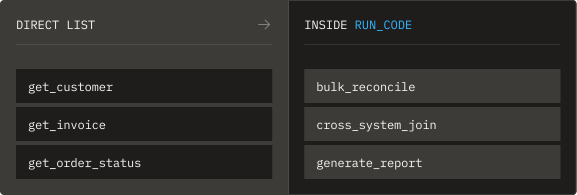
In hybrid mode, decide tool by tool which stay on the direct list and which live inside the code tool. Keep your everyday tools front and center and reserve the code tool for the operations that belong in a workflow.
>
Mark any tool "code mode only"
>
Callable inside the code tool, kept out of the direct list
Your Named Entry Point
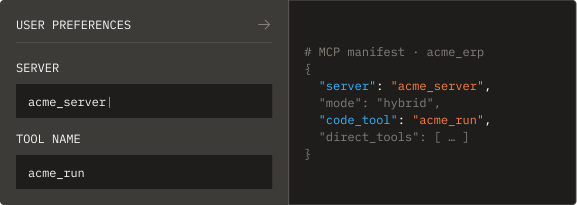
The code tool name defaults to `run_code`, and you can rename it to match your server, brand, or naming conventions. One clear entry point, named the way your team expects.
When to use each
Direct tools and code mode are two ways to work, and the best servers use both. Hybrid mode is exactly why: keep the direct path for everyday requests and add the code tool for the workflows that need it.
`run_code`Safety & Applications
Security & Enterprise Features
Enterprise validation
Enterprise-grade validation applied to every call the code tool runs
Client-specific
Client-specific behavior adapted for Claude, ChatGPT, Copilot, and custom MCP clients
Access carried through
Resource-level and role-based access carried through to every underlying function
Non-destructive
Switch modes, rename the code tool, and re-scope visibility without rebuilding your server
Format Support
Multiple response formats supported across the tools code mode exposes
Real-World Applications
Multi-step workflows
Chain lookups, queries, and actions that depend on each other in a single call
Data that comes together
Pull from several tools and combine the results before the AI responds
Automation-style servers
Built around orchestrated sequences rather than one-off lookups
Best of both
Keep everyday tools direct and reserve code mode for the heavy lifting, all in hybrid mode
FAQs
Common questions
Have a question we didn't answer?
Reach out to our team — we're happy to walk through any scenario, including regional pricing, eOne AI bundles, and transition pricing from existing Popdock plans.
Code mode adds a single code execution tool to your MCP server for complex, multi-step workflows. Your AI assistant calls the functions it needs programmatically from within that one tool, composing several operations together. It works alongside your individual tools, not in place of them.
Use direct tools for simple, single-step requests — they're fast and they're the default. Reach for code mode when a request spans several tools, needs operations composed together, or relies on tools that build on each other's results.
No. Hybrid mode runs both side by side. Your direct tools handle everyday requests and the code tool handles the workflows, and you decide tool by tool which is which.
No. Code mode only changes how tools are presented to the AI client. Your tools, their configuration, and their security stay exactly as you built them.
Code mode works across Claude, ChatGPT, Copilot, and custom MCP clients, with behavior adapted per client.
Ready to unlock your data?
Start building tools that turn your business systems into AI superpowers
Join forward-thinking companies that are transforming their operations with intelligent, secure AI automation.