Resources Glossary
A general-purpose model has never heard of your status codes, your fiscal calendar, or what your team means by "on hold." A glossary resource is your vocabulary, written by you, delivered on your terms.
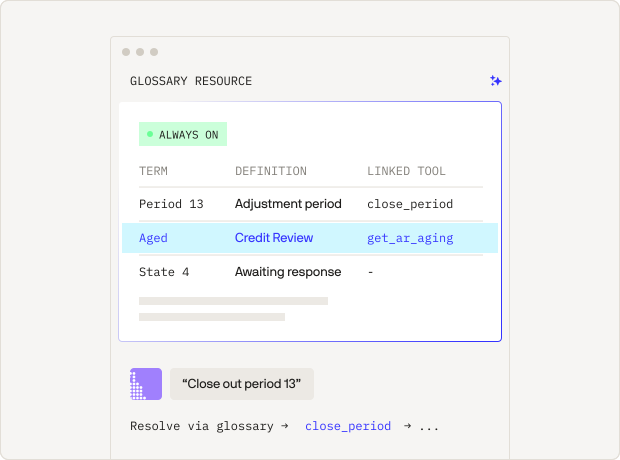
Give AI the Vocabulary Your Business Runs On
Terms and Definitions You Control
Guessing is the most expensive thing an assistant can do.
Write it down once
Add a term, write the definition your business actually uses, and AI stops inferring. No prompt engineering, no retraining, no repeating yourself in every conversation.
>
Plain-language definitions written by the people who own the term
>
Add, edit, and remove terms as your business changes
>
Terms are searchable and editable directly in the table
>
No modeling, no scripting, no prompt rewrites
Terms That Point to the Right Tool
Knowing what a word means is only half the job.
Link a term to its tool
Each glossary term can be linked to a tool on the same server. When someone asks about aged receivables, AI knows both what the phrase means and which tool answers questions about it.
>
Link any term to any tool on the server
>
Fewer wrong tool calls and fewer retries
>
Vocabulary and capability described in one place
>
Optional, so purely definitional terms stay simple
Delivery Modes for Every Situation
Not every definition deserves space in every conversation.
Always on, on demand, or off
Choose how each glossary reaches your clients. Always on for the context every conversation needs. On demand when AI should reach for it only when a term comes up. Off while you are still drafting.
>
Always on for core vocabulary that should never be missed
>
On demand for specialist terms that would otherwise crowd the context
>
Off to draft and review before anyone sees it
>
Change the mode at any time, with no client-side changes
Ensure Security and Adaptability
in Any Environment
[01]
The Right Vocabulary for the Right Audience
Different teams use the same word to mean different things.
Governance at the resource
Publish more than one glossary and grant access per resource, by user, or by team. The finance glossary reaches finance, the field service glossary reaches the field, and no one gets a definition that belongs to another department.
>
Multiple glossaries per server
>
User-level and team-level access rules
>
Per-client restrictions on which glossaries are reachable
>
Set a glossary to inactive to withdraw it instantly
[02]
Versions and Rollback
Definitions are edited by committee, and committees change their minds.
Draft, publish, roll back
Build up a set of terms as a draft, publish when the wording is agreed, and roll back if a change causes confusion. Live conversations only ever read the published version.
>
Draft changes without affecting live conversations
>
Version notes recording what changed and why
>
One-click publish and one-click rollback
>
Full version history retained
[03]
Consistency Across Every Client
Vocabulary that only works in one tool is not vocabulary.
Defined once, honored everywhere
The same glossary serves every connected client, so a term means the same thing whether the question was asked in a chat interface, an IDE, or an agent running on a schedule.
>
One definition across every MCP client
>
No per-client prompt maintenance
>
Consistent answers regardless of where the question started
>
Every read logged with user, client, and timestamp
Real-World Applications
Sales Teams

"Patch" is defined as a sales territory rather than a software update, and the term is linked to the territory reporting tool.
Finance Departments

"Period 13" is defined in the glossary as the adjustment period, linked to the tool that handles it, so nothing gets posted to December by mistake.
Support Operations

Status codes are defined once, so "state 4" resolves to "awaiting customer response" instead of being passed through as a meaningless number.
Operations and Inventory

"WIP," "at risk," and your internal job stage names are all defined and linked to the tools that report on them.
Built for Scale,
Designed for Simplicity
Write your vocabulary down once, and every assistant in the business inherits it. As terminology shifts, edit the glossary and every conversation follows. As new departments come on board, publish a glossary of their own instead of stretching someone else's. Your business language becomes as available as asking a question, as governed as your most sensitive data, and as precise as the people who defined it.