Run Actions
Stop switching between systems to get work done. PopdockAI's Run Action tools let your AI assistant execute business processes directly and trigger any workflow across your connected systems.

Put Users in Full Control of Actions
Pre-Build Actions
Pre-Built Actions for Instant Productivity
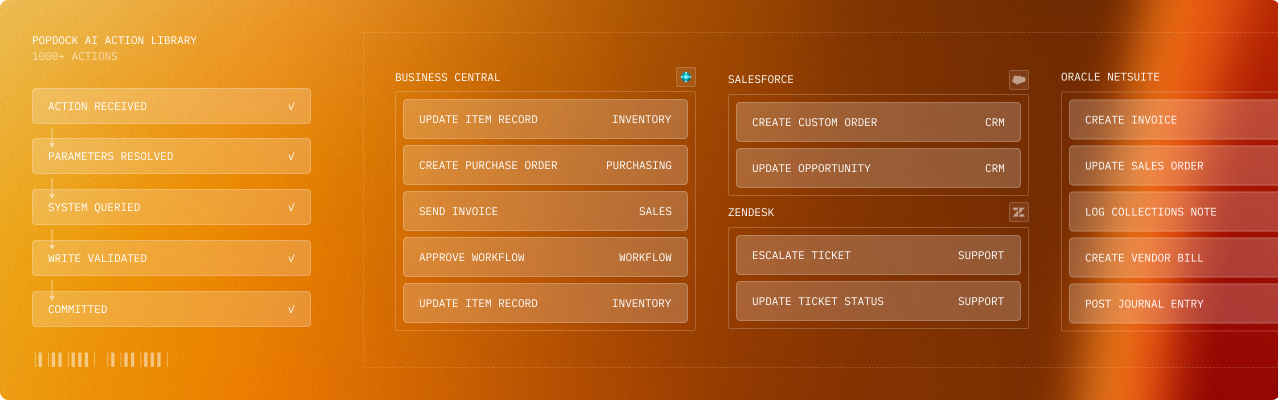
Leverage PopdockAI's extensive library of pre-configured actions across all your connected systems. We've mapped everything from business operations to executable workflows, so you can deploy powerful automation immediately.
Ready-to-use operations
Whether you're working with Business Central, Salesforce, Zendesk, or any other connected system, the actions you need are already defined, tested, and ready to deploy through your MCP server.
- Post transactions and journal entries
- Create and update customer, vendor, and item records
- Generate and send documents and reports
- Trigger approval workflows and business processes
- Manage inventory movements and adjustments
- Process payments and receipts
Custom Actions
Custom Actions via REST APIs
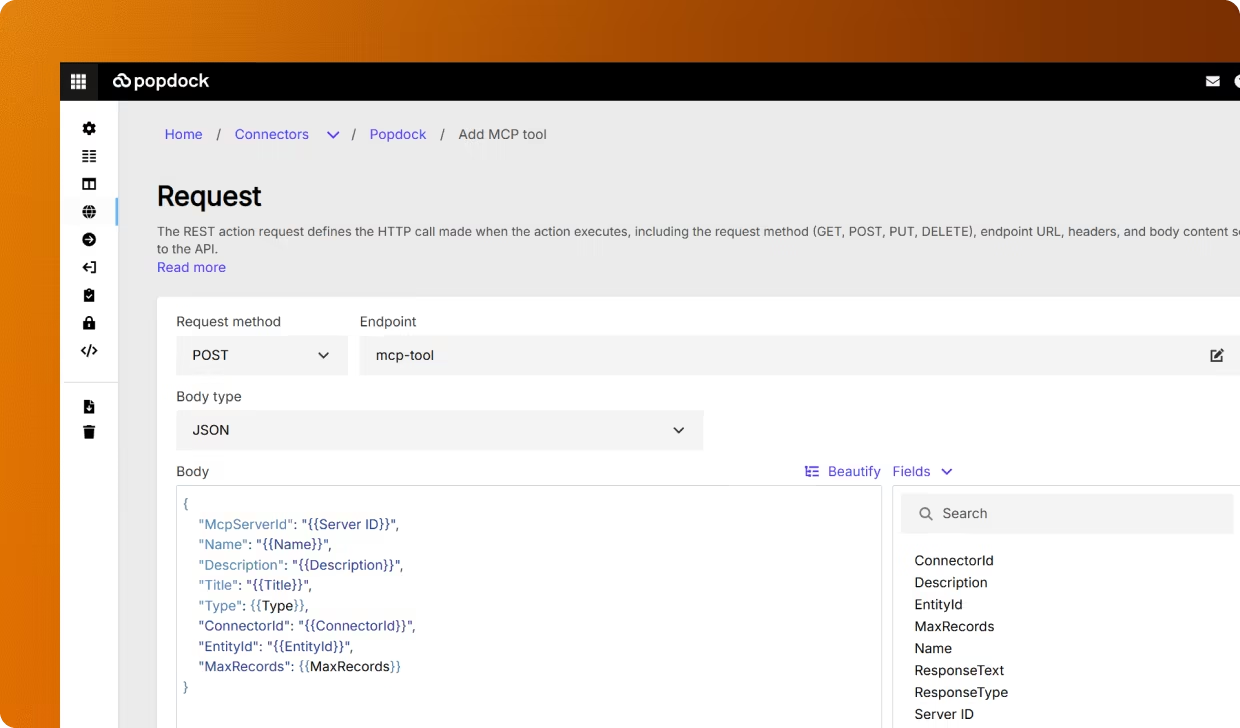
Sometimes your unique business needs actions that go beyond the pre-built library. Connect to any REST API, turning proprietary systems, custom applications, and third-party services into AI-accessible operations.
Build your own integrations
Define the endpoint, map the parameters, configure authentication, and your custom action becomes as accessible as any standard operation. Your entire technology stack becomes AI-ready.
- Connect to internal APIs and custom applications
- Integrate with external services and SaaS platforms
- Trigger webhooks and automation workflows
- Execute specialized business logic unique to your operations
Dynamic Parameter Mapping
Dynamic Parameter Mapping
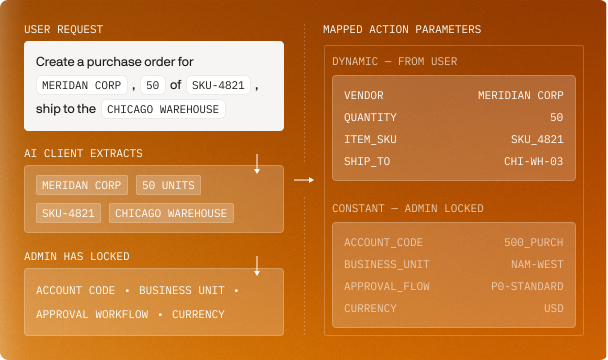
Actions need data to execute, and PopdockAI gives you complete control over how that data flows from user requests into your business systems.
Set action values via parameters
Let users provide the data dynamically through conversational requests and automatically map those values to the appropriate action fields. Parameters capture user intent and translate it into structured API calls.
Set action values from constants
Some values should never change or should be set administratively. Lock in default values, standard codes, system identifiers, or policy-driven settings that every execution of this action should use, regardless of what the user specifies.
The power of both
Combine dynamic parameters with fixed constants to create actions that are both flexible and controlled. Users specify what varies (customer, quantity, date), while your governance rules enforce what stays consistent (account codes, approval workflows, business units).
Ensure Security & Validation Across your Systems
Bulletproof Parameter Validation
Actions that modify business data can't afford mistakes. Every parameter is validated before execution to ensure your business systems receive clean, correct, and compliant data.
Multi-layered validation
Users get immediate, clear feedback when something needs correction before any system is touched. Your data stays clean, and your processes stay reliable.
Type checking: Ensure numbers are numbers, dates are dates, and IDs match expected formats
Range enforcement: Block out-of-bound quantities, invalid dates, and unreasonable values
Business rule validation: Verify customer IDs exist, product codes are active, and account numbers are valid
Dependency checking: Ensure required relationships exist (customer has valid payment terms, product has active pricing)
Format verification: Validate phone numbers, email addresses, postal codes, and custom field patterns
Parameter-Level Security
Not all parameters should be accessible to all users. PopdockAI's parameter security lets you control who can set which values, adding granular access control to your action tools.
Restrict by role and context
Security isn't just about what actions users can run—it's about what parameters they can control within those actions. PopdockAI gives you both layers of protection.
Lock critical parameters so only managers can override default values
Hide sensitive fields from junior staff while keeping them visible to supervisors
Restrict discount percentages, approval amounts, or pricing modifications based on user authority
Control which business units, cost centers, or accounts users can edit and act against
MCP Client-Specific Instructions
Various MCP clients excel in different scenarios, and your action tools should leverage those strengths. PopdockAI's client-based instructions customize how actions are presented and executed based on which MCP client is making the request.
Optimize for context
The same action adapts its communication style to match the client's environment. It can be explanatory in chat and structured in code editors, optimized for each platform's strengths.
Detailed confirmation messages for conversational clients like Claude Desktop
Concise status returns for developer-focused tools like Cursor
Rich formatting and result previews for clients with advanced rendering
Streamlined responses for automation-focused integrations
Execution You Can Trust
Every action is logged with full parameter values, timestamps, user context, and results. Track what happened, when it happened, who triggered it, and what the outcome was. View complete audit trails for compliance, troubleshooting, and process optimization.
Before execution: Validate, secure, and verify
During execution: Log, monitor, and track
After execution: Confirm, report, and audit
Real-World Applications
Finance Teams
Parameters capture receipt data from the conversation, constants enforce company policy on approval workflows and cost center codes, and validation ensures the account exists and is active.
Sales Operations
The user specifies the customer and products dynamically, constants fill in the company standard payment terms and shipping methods, and parameter security prevents unauthorized discount modifications.
Support Teams
The action triggers a workflow in the ticketing system via REST API, the parameters route to the correct team, validation confirms the ticket exists and is eligible for escalation, and security ensures only authorized agents can escalate.
Inventory Management
Dynamic parameters specify the item and quantity, constants lock in the adjustment reason codes and posting accounts, and validation verifies warehouse location and item availability.
Built for Enterprise Operations
Deploy actions once, and use them thousands of times. Update parameter mappings centrally without disrupting user workflows. Add new security rules without rebuilding tools. As your business processes evolve, your action tools evolve with them without development sprints and deployment headaches.
Your business operations become as simple as having a conversation, as secure as your most stringent policies, and as reliable as your mission-critical systems demand.
Ready to unlock your data?
Start building tools that turn your business systems into AI superpowers
Join forward-thinking companies that are transforming their operations with intelligent, secure AI automation.