

If you've been poking around PopdockAI's command-line tooling, you may have done a double-take: there are two CLIs.
popdock— the Popdock CLI. Browse connectors and lists, run queries, run actions, and get the data back as JSON, a table, or CSV.popdock-manage— the Popdock Management CLI. Create, read, update, delete, and export the resources that make up your PopdockAI account, including connectors, entities, endpoints, MCP servers, tools, prompts, and the rest.
At a glance, they look redundant, but they aren't. They live on two different sides of the same platform, and keeping them apart is a deliberate design choice.
The one-line version
popdockis the data plane. It uses your PopdockAI setup to answer questions: "give me the customers with a balance over 500."popdock-manageis the control plane. It builds and administers that setup: "create the connector, define the entity, publish the MCP server."
One reads through the door, while the other installs the door.
An analogy you already know
Think of a database. You use two very different tools with it, and nobody finds that strange:
- A query client (
psql, a BI tool, your app's data layer) runs SELECTs all day. It's what most people touch most of the time. - A schema / admin tool (migrations, DDL, an admin console) defines the tables that make those queries possible. You run it deliberately, less often, and usually with more privilege.
popdock is the query client. popdock-manage is the schema-and-admin tool. It’s the same database underneath but with two different jobs.
What each one is for
popdock — reach the data
The Popdock CLI is built for consuming data from the systems PopdockAI connects. Its vocabulary is about asking questions:
# Discover what's queryable, then ask a precise question
popdock connectors list --contains "Sales"
popdock lists list --connector <connector-id>
popdock query <list-id> --filter "Balance>500" --sort "Balance:desc" --top 3
It has a rich, read-oriented feature set, like server-side filtering and sorting, a full filter language, favorites, actions, and fiscal periods all in service of one job: get the right data out, cleanly, for an agent, a script, or a human.
popdock-manage — build the setup
The Management CLI is built for administering PopdockAI itself. Its vocabulary is CRUD:
# Manage the resources that define your account
popdock-manage resources --search mcp
popdock-manage create tag --set Name="Finance"
popdock-manage update mcp-server 1842 --set Name="Renamed"
popdock-manage export connector 5501 --out connector.json
Every resource type follows the same verbs — list, get, create, update, delete, export — driven by your instance's live API catalog. It's how you provision connectors from a script, promote configuration between environments, or roll out MCP servers without clicking through the UI.
Side by side
Why not just one CLI?
We could have crammed both jobs into a single binary, but we didn't, for a variety of reasons:
Different audiences, different verbs. The person (or agent) querying customer balances all day thinks in query and --filter. The administrator provisioning a connector thinks in create and --body. Merging them produces a tool where half the commands are noise to whoever's holding it.
Least privilege is a feature. An AI agent that queries your customers should not also be able to delete a connector or rewrite an MCP server. Keeping the data-access surface (popdock) separate from the configuration surface (popdock-manage) means you can hand an agent the first without ever exposing the second. Two tools, two tokens, two blast radii.
Different cadence, different risk. popdock runs constantly and reads. popdock-manage runs occasionally and writes, and its writes reshape your account. Those deserve different defaults, different confirmations (delete wants --yes), and different scrutiny. One combined tool would have to average those out. Two tools each get it right.
Each stays simple. Because popdock never has to worry about mutating config, and popdock-manage never has to worry about a filter DSL, both are smaller, sharper, and easier to reason about than the merged tool would be.
They share a spine
None of this means they're strangers. Both are CLI tools that speak the same dialect, so learning one teaches you most of the other:
- The same output formats:
-o json(default),table, orcsv. - The same honest exit codes:
0success,2usage error,78misconfiguration,1for API/runtime failures, so both gate CI cleanly. - The same
doctorcommand to diagnose your setup before you start. - The same auth:
POPDOCK_TOKEN(or--token), andPOPDOCK_API_BASE_URLfor non-US regions.
It’s the same platform with the same conventions, but with two surfaces, each shaped for its job.
Which one do I want?
- Getting data out — answering a question, feeding an agent, exporting a report, or running an action? Reach for
popdock. - Setting PopdockAI up — creating connectors, defining entities, publishing MCP servers, or promoting config between environments? Reach for
popdock-manage.
Most teams end up with both installed: popdock in the hands of the agents and analysts who ask questions, and popdock-manage in the provisioning scripts and administrator toolkits that build what they're asking against.
Two CLIs, one platform. Because using your data and building the setup behind it are two different jobs, and each deserves a tool that does it well.
PopdockAI, which had been available for limited release since October 2025 for customers and partners with special use cases, is now rolling out to the general public.
Web UI vs. CLI. To an AI agent, this is the difference between a task that costs a few thousand tokens and one that costs a few hundred thousand.
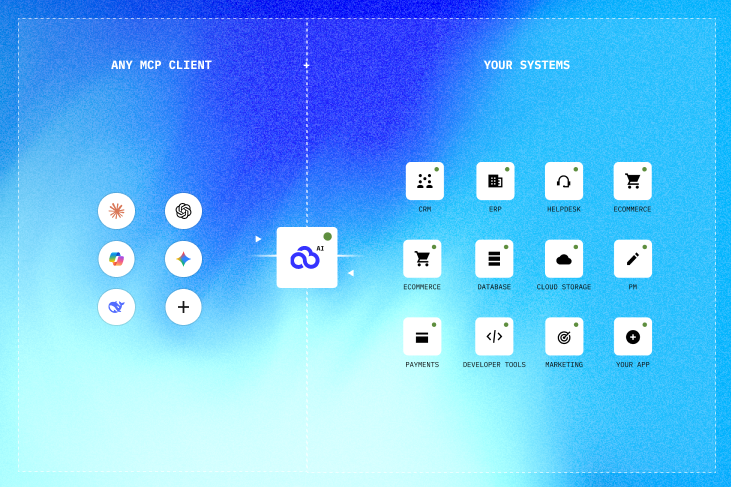
PopdockAI gives AI agents two different ways to reach your business data, and they're built for different contexts: Popdock CLI and MCP Server
From AI Potential to AI Performance in Minutes
One layer.
All your apps.
Any AI tool.
Join forward-thinking companies that are transforming their operations with intelligent, secure AI automation.